Accept Online Payments Without Building a Webshop

Accept Online Payments Without Building a Webshop
Many small businesses start with the same assumption:
“If we want customers to pay online, we need a webshop.”
Sometimes that is true.
If you sell hundreds of products, manage stock, handle shipping zones, offer variants, run discount codes, process returns, and need a real ecommerce operation, then a webshop can make sense.
But many businesses are not there.
They sell:
- services
- appointments
- deposits
- classes
- workshops
- gift cards
- fixed-price packages
- simple local orders
For those businesses, a full webshop can be more machine than the job requires.
The better question is not:
“Which ecommerce platform should we use?”
It is:
“What is the smallest reliable payment flow that lets customers pay without creating unnecessary work?”
That answer is often much smaller than a webshop.
1. A Webshop Is More Than a Payment Button
A webshop is not just a way to collect money.
A real webshop usually includes:
- product catalogues
- product images and descriptions
- categories
- inventory rules
- shipping setup
- tax settings
- checkout configuration
- discount logic
- order management
- customer emails
- returns and refunds
- plugins, apps, or platform extensions
That can be valuable.
But it also means more setup, more decisions, and more maintenance.
For a business selling ten yoga classes, three service packages, seasonal flower bouquets, or a handful of gift cards, that may be unnecessary complexity.
A customer does not always need a store.
Sometimes they only need a clear offer, a trusted payment step, and a confirmation.
2. The Cost Is Not Just the Monthly Platform Fee
Webshop platforms often look affordable at first.
A plan might start around the cost of a normal monthly subscription.
But the plan is rarely the full cost.
Once a webshop becomes real, businesses often need:
- a paid theme or custom design
- payment setup
- tax configuration
- shipping rules
- apps or extensions
- email templates
- product photography
- product copy
- legal pages
- testing
- launch support
- ongoing updates
For small and medium businesses, public pricing guides and agency benchmarks often place ecommerce website builds in the range of several thousand euros or dollars, with timelines measured in weeks rather than days.
That does not mean webshops are bad.
It means they are not small decisions.
The risk is not only paying too much.
The bigger risk is building a system that is heavier than the business can actually use.
3. Time Is a Hidden Cost Too
A webshop asks for many decisions before launch.
You need to decide:
- what counts as a product
- how products are grouped
- whether there are variants
- how taxes should appear
- what shipping options exist
- what happens after purchase
- which emails customers receive
- how refunds are handled
- who manages the store after launch
Each decision may be reasonable.
Together, they slow the project down.
That is why many small ecommerce projects stretch from “we just need online payments” into weeks of product setup, platform choices, design decisions, and admin work.
For some businesses, that is worth it.
For others, it is a detour.
If the offer is simple, the payment flow should be simple too.
4. Payment Links and Hosted Checkout Solve a Different Problem
A lighter payment setup does not try to become a full store.
It usually does one thing well:
Let the customer pay securely.
A simple setup might use:
- a payment link
- a pay-now button
- a small payment page
- a secure hosted checkout
- a confirmation or thank-you page
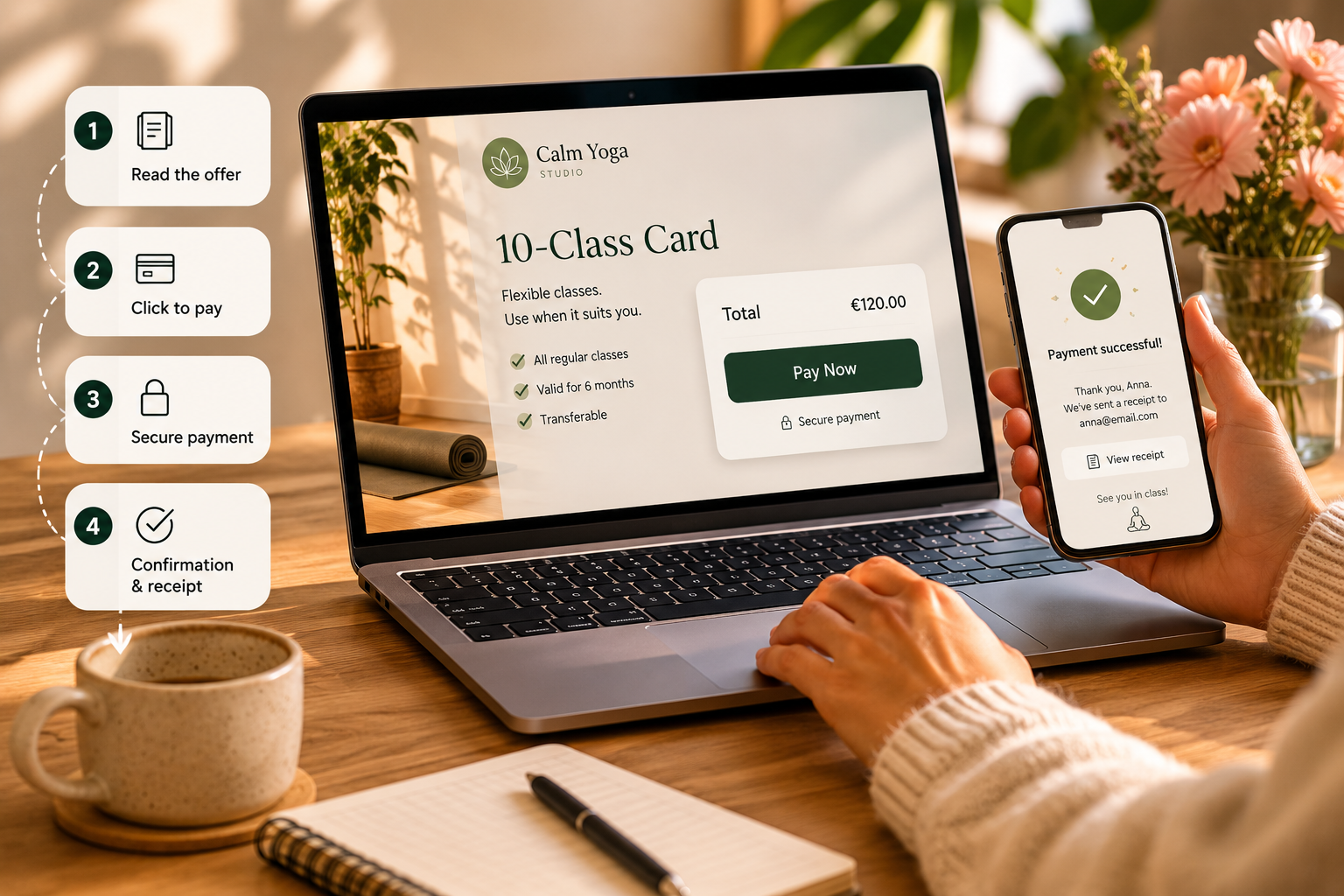
The customer journey can be very simple:
- The customer reads the offer
- They click a payment button
- They complete payment on a secure payment provider page
- They return to your website or receive confirmation
No catalogue.
No cart.
No shipping engine.
No store dashboard that someone needs to maintain every week.
Just a clear path from interest to payment.
5. This Works Especially Well for Service Businesses
Many service businesses do not sell like ecommerce stores.
A yoga studio does not always need a full product catalogue.
It may need customers to pay for:
- a drop-in class
- a class card
- a private session
- a workshop
- a gift card
A consultant may need payment for:
- an intro session
- an audit
- a fixed package
- a deposit before work starts
A florist may need payment for:
- a seasonal bouquet
- a pickup order
- a local delivery
- a gift card
- a simple custom request
These are not always webshop problems.
They are payment-flow problems.
And payment-flow problems should not automatically become ecommerce builds.
6. When a Webshop Does Make Sense
A webshop is still the right answer when the business has real store needs.
You probably need a webshop if customers must:
- browse many products
- compare categories
- choose sizes, colours, or variants
- calculate shipping
- manage carts
- use discount codes
- reorder regularly
- track stock availability
- buy from multiple product collections
- receive automated order updates
In that case, avoiding a webshop can create more problems than it solves.
The mistake is not building a webshop.
The mistake is building one before the business has webshop-shaped needs.
The right setup depends on what the customer is actually trying to do.
7. The Lighter Path Can Be a Better First Step
For many small businesses, the smartest move is not to build the final system first.
It is to test whether customers will actually pay.
A simple payment setup can help you test:
- which offer gets interest
- whether customers pay upfront
- whether deposits reduce no-shows
- whether gift cards sell
- whether packages work better than single sessions
- whether online payment reduces admin
This matters because a webshop is not only a technical investment.
It is an operational commitment.
Someone has to manage it.
Someone has to update products.
Someone has to answer customer questions.
Someone has to maintain the process.
A lighter payment flow lets you prove demand before building the heavier system.
8. The Real Goal Is Less Friction
Online payments are not valuable because they are digital.
They are valuable because they reduce friction.
Without a clear payment path, customers may need to:
- send a message
- wait for a reply
- ask for payment details
- wait for an invoice
- remember to pay later
- confirm manually
- ask if the payment went through
Every extra step creates a chance for the customer to drift away.
A simple payment flow keeps momentum alive while the customer is ready.
That is the real business value.
Not the payment button.
The reduced hesitation.
9. Your Payment Setup Should Belong to Your Business
A good payment setup should not feel like a mystery box.
For many small businesses, the cleanest approach is to connect the payment flow to the business’s own payment provider account.
That means the website can guide the customer, explain the offer, and present the payment clearly, while the actual payment relationship stays between the business and the payment provider.
This keeps the setup lighter.
It also avoids hiding a simple payment need inside a larger platform unless the business truly needs that platform.
The customer does not need to understand any of this.
They only need to feel that the next step is clear, secure, and professional.
10. A Simple Payment Page Still Needs Good Structure
A lighter setup does not mean careless setup.
A payment page still needs:
- a clear offer
- a clear price
- VAT-aware wording
- business details
- payment button or checkout link
- receipt settings
- confirmation message
- next-step instructions
- refund or contact information where relevant
This is where many businesses get it wrong.
They add a button but forget the journey around it.
A payment button alone does not create trust.
The page around it does.
11. A Practical Rule of Thumb
Use this simple rule:
If customers need to browse, compare, filter, ship, and reorder, build a webshop.
If customers need to understand one clear offer and pay, start smaller.
That smaller setup might be enough for months.
It might even be enough permanently.
And if the business grows into real ecommerce needs later, the earlier payment setup was not wasted.
It helped prove what customers actually wanted to buy.
Bottom Line
You do not need a webshop just because you want to accept payments online.
You need the right payment path for the way your business actually sells.
For many small and medium businesses, that means starting with:
- one clear offer
- one trusted payment step
- one confirmation flow
- one setup that is easy to manage
A webshop is powerful when the business needs a store.
But when the real problem is simply getting paid without chasing, a lighter payment flow can be faster, cheaper, and easier to maintain.
Start with the smallest setup that solves the real problem.
Then build more only when the business has earned the complexity.
Sources
- Shopify - General setup checklist
- Shopify - Ecommerce website cost guide
- WooCommerce - Pricing
- WooCommerce - Start with WooCommerce in 5 steps
- BigCommerce - Pricing
- Wix - Creating your online store
- Squarespace - Transaction fees and payment processing rates
- Squarespace - Create and manage Pay Links
- GoodFirms - Website construction cost survey
- OuterBox - Ecommerce website pricing and costs
- ICTS - Website development cost survey


